Here's the second set:
Ant at 3x by =dalantech on deviantART
Miner Bee Profile by =dalantech on deviantART
It's My Flower by =dalantech on deviantART
September Dragon XIII by =dalantech on deviantART
Finger Licking Good V by =dalantech on deviantART

Saturday, December 20, 2008


Thursday, December 18, 2008
Portfolio Series 2008 Part 1
I'm going through my portfolio and re-editing my best images of 2008. Here is the first set -more to come. If you click on a photo you'll get my page at Deviant Art that has the image, and if you click on the image on that page you can see a 1280 pixel wide version of the shot.
Scraping out the Pollen by =dalantech on deviantART
Hungry Hoverfly VI by =dalantech on deviantART
Sleeping Solitary II by =dalantech on deviantART
Dragon in Flight by =dalantech on deviantART
Honeybee on Sunflower I by =dalantech on deviantART
Scraping out the Pollen by =dalantech on deviantART
Hungry Hoverfly VI by =dalantech on deviantART
Sleeping Solitary II by =dalantech on deviantART
Dragon in Flight by =dalantech on deviantART
Honeybee on Sunflower I by =dalantech on deviantART
Monday, December 15, 2008
Living Pixels Temporarily Down
From Allan Melsen, site owner & administrator of livingpixels.org:
"As many of you have noticed, Living Pixels (www.livingpixels.org) has been down for some days now.
Followed by a series of accidents; modifications screwing up the database and configuration was the first problem. During this, I fiddled back and forth and couldn't make it work...
So I decided to just delete the setup and restore a backup from the day before... Easier said than done. I accessed the control panel at the hosting center and clicked restore... chose the newest restore which was only 1 day old... after waiting 45 minutes, my data still wasn't back - so I opened a support case with the hosting center...
I asked in the mail how long this normally takes because I had waited for 45 minutes and still couldn't see my data having been restored, and got the following reply:
------------------------------------------------------
"Generally, this should not take long at all. I gave it a bit more time,
just in case it had a lot of data to restore. When I noticed nothing had
been restored two hours later, I went ahead and had an admin look further
into it for you. It looks like the problem is that, unfortunately, there
aren't any backups to restore it to."
"I'm very sorry about that! Although we don't guarantee backups, we do try
to provide them, and we are looking into why the backups weren't
performed in the first place. Your best bet, at this point, is to just
re-upload the files."
"Again, I apologize for the problems this caused you."
-----------------------------------------------------
So basically, this means everything from the last month and a half is GONE.
So, therefor I quit the hosting company and are getting a refund from the money I spend with them... Not that thats a comfort.
To make things even worse, I've had to put my beloved dog of 4 years to sleep after he tore a ligament on his right hind leg. Our family has been in deep sorrow after losing this family member, and those of you who have a dog will know how attached you can get to them. This also put a bit of strain on my motivation and desire to work on this error...
Things are looking brighter now though... and I'm now working on finalizing a new server setup, and hope to have the site up and running early january...
I'm terribly sorry about all this fuss... hopefully Living Pixels will be back in an even stronger form than before... "
"As many of you have noticed, Living Pixels (www.livingpixels.org) has been down for some days now.
Followed by a series of accidents; modifications screwing up the database and configuration was the first problem. During this, I fiddled back and forth and couldn't make it work...
So I decided to just delete the setup and restore a backup from the day before... Easier said than done. I accessed the control panel at the hosting center and clicked restore... chose the newest restore which was only 1 day old... after waiting 45 minutes, my data still wasn't back - so I opened a support case with the hosting center...
I asked in the mail how long this normally takes because I had waited for 45 minutes and still couldn't see my data having been restored, and got the following reply:
------------------------------------------------------
"Generally, this should not take long at all. I gave it a bit more time,
just in case it had a lot of data to restore. When I noticed nothing had
been restored two hours later, I went ahead and had an admin look further
into it for you. It looks like the problem is that, unfortunately, there
aren't any backups to restore it to."
"I'm very sorry about that! Although we don't guarantee backups, we do try
to provide them, and we are looking into why the backups weren't
performed in the first place. Your best bet, at this point, is to just
re-upload the files."
"Again, I apologize for the problems this caused you."
-----------------------------------------------------
So basically, this means everything from the last month and a half is GONE.
So, therefor I quit the hosting company and are getting a refund from the money I spend with them... Not that thats a comfort.
To make things even worse, I've had to put my beloved dog of 4 years to sleep after he tore a ligament on his right hind leg. Our family has been in deep sorrow after losing this family member, and those of you who have a dog will know how attached you can get to them. This also put a bit of strain on my motivation and desire to work on this error...
Things are looking brighter now though... and I'm now working on finalizing a new server setup, and hope to have the site up and running early january...
I'm terribly sorry about all this fuss... hopefully Living Pixels will be back in an even stronger form than before... "
Sunday, December 14, 2008
Ignore the man behind the cutain...
This blog has been in dire need of an overhaul for far too long, and I'm finally getting around to using a random header image so that when you come to the site, click on a link, or refresh the page the logo at the top changes.
Saturday, December 13, 2008
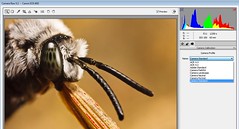
Picture Style Support!
I just installed Adobe Camera RAW 5.2 and found this jewel on the Camera Calibration tab -Thanks Adobe!
Monday, December 8, 2008
Will Work for Credit
Photo credit, that is. If you are a professor or scientist looking for images then contact me; I often license my work for as little as a photo credit. You get uncropped images of a wide variety of insects and I get some publicity –we both win. This is where I post my best work. I realize that a lot of text books have limited printing runs and are produced on a very tight budget, so I’m willing to work with you to get some exposure for my images. You can contact me here by posting a comment or send an email to dalantech@gmail.com
If you are putting together a calendar or a book on macro photography then I expect to get paid ;) Please see Tom Stack and Associates. Tom is managing my portfolio and has access to all of the images at my Flickr account.
If you’re reading this and know of anyone who is looking for my kind of photos then please pass this information to them.
If you are putting together a calendar or a book on macro photography then I expect to get paid ;) Please see Tom Stack and Associates. Tom is managing my portfolio and has access to all of the images at my Flickr account.
If you’re reading this and know of anyone who is looking for my kind of photos then please pass this information to them.
Thursday, December 4, 2008
Banded Eye Drone Deconstruction
This one is going to be a slight departure from my previous deconstructions in that I’m going to talk more about the light in this shot than how I shot it. I will tell you that I used the Left Hand Brace Method to take it –check out the tutorial for the details.
For quite some time now I’ve been using the two flash heads of the MT-24EX in a fill / key concept. One flash head toward the top of the lens as the Key light to illuminate the area that I’m shooting (and the subject) and the other flash head lower and to the side as a Fill light to bring out details in the shadows. One of the problems with using two flash heads is glare –and I always mistakenly assumed that two flash heads meant twice the possibility of getting a hot spot. But I was wrong…
Recently I put both of the flash heads on Kaiser adjustable flash shoes thinking that changing the angle between the flash, subject, and sensor would help to eliminate some reflections. But all it really did was move the reflections to another part of the critter I was shooting. While looking at the photos I had taken a light bulb lit up in the back of my head: The glare was due to the angle between the flash heads, subject, and sensor –it was always the same for both of the flash heads. It didn’t matter that they were on a different part of the flash mount; the angle was always the same. Add to the flash the harsh sunlight that I typically shoot in and hot spots or a red channel that is too much to the right in the histogram is almost always going to be a problem.
So why not elevate a single flash head so that the MT-24EX’s flash heads are not at the same angle relative to the subject…
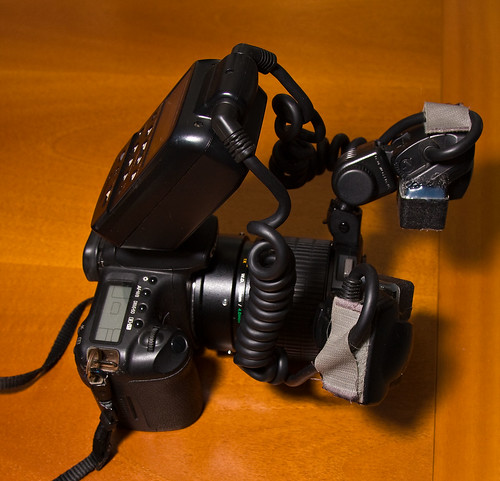
Since I’m using one as a Key and the other as a Fill it made sense to me to elevate the Key flash since its job is to illuminate the subject and the scene around it. I then attached the Fill light directly to the Canon flash mount and this is the result:
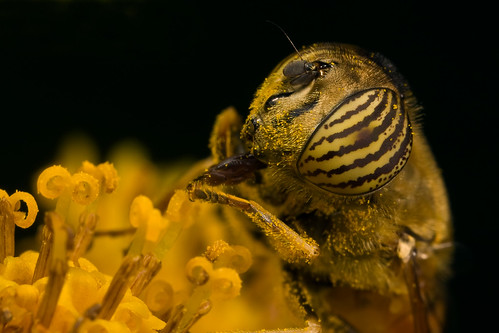
Very little glare –just a few pixels in that entire image. There is a slight shadow under the Drone’s eye, good for adding depth to the image, but there is plenty of light from the Fill to bring out the details. The kind of wrap around light that I like to shoot with simply because it isn’t dead even –if it were then the photo would look flat. This is how the flash heads look on the Canon mount with the Key elevated:
Footnote: If you really want to improve your macro photography then start viewing the light as a compositional tool and look for ways to manipulate it to get the effect you want...
For quite some time now I’ve been using the two flash heads of the MT-24EX in a fill / key concept. One flash head toward the top of the lens as the Key light to illuminate the area that I’m shooting (and the subject) and the other flash head lower and to the side as a Fill light to bring out details in the shadows. One of the problems with using two flash heads is glare –and I always mistakenly assumed that two flash heads meant twice the possibility of getting a hot spot. But I was wrong…
Recently I put both of the flash heads on Kaiser adjustable flash shoes thinking that changing the angle between the flash, subject, and sensor would help to eliminate some reflections. But all it really did was move the reflections to another part of the critter I was shooting. While looking at the photos I had taken a light bulb lit up in the back of my head: The glare was due to the angle between the flash heads, subject, and sensor –it was always the same for both of the flash heads. It didn’t matter that they were on a different part of the flash mount; the angle was always the same. Add to the flash the harsh sunlight that I typically shoot in and hot spots or a red channel that is too much to the right in the histogram is almost always going to be a problem.
So why not elevate a single flash head so that the MT-24EX’s flash heads are not at the same angle relative to the subject…
Since I’m using one as a Key and the other as a Fill it made sense to me to elevate the Key flash since its job is to illuminate the subject and the scene around it. I then attached the Fill light directly to the Canon flash mount and this is the result:
Very little glare –just a few pixels in that entire image. There is a slight shadow under the Drone’s eye, good for adding depth to the image, but there is plenty of light from the Fill to bring out the details. The kind of wrap around light that I like to shoot with simply because it isn’t dead even –if it were then the photo would look flat. This is how the flash heads look on the Canon mount with the Key elevated:
Footnote: If you really want to improve your macro photography then start viewing the light as a compositional tool and look for ways to manipulate it to get the effect you want...
Subscribe to:
Posts (Atom)